

There are dozens of schema types. Most sites need fewer than ten. This guide cuts through the noise and tells you exactly which schema fits which page so you can stop guessing and start implementing.
What is a structured data schema?
A schema type is a label. When you add schema markup to a page, you are telling Google, AI platforms, and other search systems: “Here is what this page is fundamentally about, and here is the vocabulary to understand it.” Every type on Schema.org corresponds to a real-world concept: an article, a product, a local business, an event.
The label only works when it matches reality. Applying a Product type to a blog post about products does not help you. It confuses the systems reading your markup, and those systems are getting better at detecting the mismatch.
How to choose the right schema type
Schema markup can feel overwhelming; there are hundreds of types listed on Schema.org. But the decision is simpler than it looks once you understand the one rule that governs all of it: choose the schema type that describes the main thing on the page, not the thing you want to rank for or the business outcome you are hoping to achieve.
Each page should have one primary schema type, the one that describes what the page fundamentally is. Supporting types can be layered in when they are genuinely present (for example, an Organization nested inside a product page to identify the seller), but they should never overshadow the main type.
The other firm rule: your structured data must reflect what is visibly on the page. Do not add fields for information that visitors cannot see. Search systems verify markup against page content, and mismatches can trigger manual actions or simply cause your markup to be ignored entirely.
The three families of schema types
Almost every schema type a marketer needs falls into one of three groups:
Content types
For pages where the primary value is editorial or informational. Includes Article, BlogPosting, NewsArticle, FAQPage, and HowTo. Use these on content pages where reading or learning is the main purpose.
Commercial types
For pages where the primary value is evaluating or purchasing something. Includes Product, Offer, and Review. Use these on product detail pages, pricing pages, and review-driven commercial content.
Entity & site types
For pages that represent an entity or communicate site structure. Includes Organization, LocalBusiness, BreadcrumbList, and ItemList. These help search systems understand who you are and how your site is organized.
Default Implementation Choice: Use JSON-LD for Most Sites
There are three formats for adding structured data to a page: JSON-LD, Microdata, and RDFa. All three are technically supported by Google, but JSON-LD has become the practical standard for good reason.
Why JSON-LD is the practical default
JSON-LD lives inside a <script> tag in your page’s <head> or <body>, entirely separate from your HTML content. This means your team can add, update, or remove markup without touching the page’s visual structure. It is also the format Google explicitly recommends and the one best suited for templated, at-scale implementations, whether you are managing thousands of ecommerce product pages or a SaaS blog with hundreds of posts.
Microdata and RDFa embed markup directly into HTML elements. They work, but they make pages harder to maintain and errors easier to introduce. Unless you have a specific technical constraint, there is no reason to use either over JSON-LD.
JSON-LD and AI visibility workflows
As more search traffic originates from AI platforms, consistent, well-structured JSON-LD has become increasingly valuable. These systems parse structured data to understand entities, relationships, and content attributes like authorship and publication date; all of which can support increasing your AI Visibility. JSON-LD’s clean format makes it far easier to implement at scale and audit on a regular basis.
READ: SaaS AI Visibility: The Complete Guide (No BS)
Article and BlogPosting: Use When the Page Is Primarily an Editorial Story
If a page exists primarily for someone to read (i.e. a blog post, a news piece, a thought leadership article, a guide, an explainer) then Article or one of its subtypes is the right choice.
Article vs. BlogPosting vs. NewsArticle
| Type | Use when |
|---|---|
| Article | General editorial pages — a reliable catch-all when a more specific subtype does not clearly fit |
| BlogPosting | Blog content in the traditional sense — dated posts that are author-driven, conversational, or educational |
| NewsArticle | Genuinely time-sensitive news reporting — only when the content is truly journalistic in nature |
All three fall under the Article family on Schema.org, so you are not making a radically different choice between them. When in doubt, Article is a safe and valid default for editorial content of any kind.
When to use Article or Blog Posting
Use these types for blog posts, guides, explainers, thought leadership pieces, tutorials, industry roundups, and sports articles. The critical fields (headline, author, datePublished, and image) give search systems and AI platforms structured facts to work with directly. When an AI Overview pulls a summary of your content, it is partly relying on these fields to understand what the piece is about, who wrote it, and how recent it is.
For SaaS companies with content marketing programs, Article and BlogPosting are typically the highest-volume schema types across the site. For ecommerce brands publishing editorial or buyer’s guide content, they apply equally.
Product, Offer, and Review: Use When Users Can Evaluate or Buy a Specific Item
These three types work together and form the backbone of ecommerce structured data. They are most relevant on pages where a specific purchasable item is the central subject of the page.
Product
Use Product on product detail pages where a single product is the main thing. The type supports fields like name, description, image, SKU, and brand. In the context of AI-powered shopping results, Product schema is what enables your item to surface with structured attributes rather than as a plain text listing.

For SaaS, Product schema can be relevant on specific plan or software product pages, but only when the page is genuinely focused on a distinct, evaluable offering and not a general features or pricing overview page.
Offer
Use Offer when you are presenting price, availability, seller identity, or purchase terms on-page. Offer is almost always nested inside a Product type and describes the commercial terms attached to that product. If the page shows a price, an availability status (in stock, out of stock), or a buy link, Offer is the right way to mark that information up.
Google Merchant Center and Shopping-Specific Schema
If you run an ecommerce store and want your products to appear in Google Shopping listings, product schema and Google Merchant Center work together, but they are not the same thing. Merchant Center is where you manage your product feed. Schema markup on your product pages is what Google can verify that feed data against.
Google’s automatic item improvements and automated feeds rely on being able to read structured data directly from your product pages. When your on-page schema matches your Merchant Center feed, Google has higher confidence in the accuracy of your listing data, which can improve eligibility for free product listings and Shopping ads.
The fields that matter most for this alignment are:
- name: your product title, matching what is in your feed.
- image: a crawlable, high-resolution product image URL.
- description: visible on-page product description.
- sku: your internal product identifier.
- gtin: the product’s Global Trade Item Number (barcode). This is one of the most important fields for Shopping eligibility. Google uses it to match your product to its catalog and surface accurate pricing and availability data. If your products have GTINs, always include them.
- brand: the product’s manufacturer or brand name.
- offers (nested Offer type): this is where price, availability, currency, condition, and the URL to buy the product live. For Shopping specifically, availability and price must be accurate and match what a shopper would see when they land on the page.
- shippingDetails and hasMerchantReturnPolicy: these two fields were added to the Product schema spec specifically to support Shopping features. Marking up your shipping times and return policy in structured data allows Google to surface that information directly in Shopping results, which has a measurable impact on click-through rates.
Review and AggregateRating
Use these when genuine reviews or star ratings are displayed on the page, not pulled from a third-party widget that does not render in the DOM, and not populated with made-up values. AggregateRating represents an average score compiled from multiple reviews. Review represents a single individual review.
Do not invent ratings
Google is explicit: do not mark up ratings or reviews that are not genuinely shown on the page.
Applying AggregateRating schema to a page that displays no visible reviews is a policy violation and can result in rich result ineligibility; not just for that page, but potentially across your entire domain.
Organization and Local Business: Use When the Page Represents a Brand or a Physical Location
These types address a different question from the others. Rather than describing a piece of content or a product, they describe who you are as an entity in the world and help search systems build an accurate representation of your brand.
Organization
Organization belongs on corporate and brand entity pages, typically your homepage or About page. It communicates your brand name, logo, social profiles, contact information, and primary URL in a structured way that search systems can use to anchor their understanding of your company as an entity.
For SaaS companies especially, Organization schema on the homepage is one of the highest-value, lowest-effort implementations available. It helps establish brand entity clarity, which matters increasingly in AI-driven search where systems are trying to match queries to known entities. It is often paired with a WebSite type and a SearchAction when a sitewide search function is present, though these remain subordinate to the primary Organization type.
LocalBusiness
LocalBusiness is the right type for pages representing a physical location: address, opening hours, phone number, and service area. For ecommerce brands with brick-and-mortar stores, individual location pages should use LocalBusiness while the parent brand homepage uses Organization.
Do not apply LocalBusiness to a headquarters page that lacks genuinely useful local information for visitors.
BreadcrumbList: Use When You Want Search to Understand Page Hierarchy
BreadcrumbList tells search engines how a page fits within your site’s hierarchy. When implemented correctly, it replaces or supplements the raw URL shown in search results with a clean, readable path.

When to use BreadcrumbList
BreadcrumbList is most valuable on sites with deep navigation structures; large ecommerce catalogs with multiple category levels, SaaS knowledge bases with nested topic trees, or any site where the path from homepage to detail page involves three or more levels. It does not require a visible breadcrumb component on the page (though it helps to have one that mirrors the markup), but your markup should accurately reflect your actual URL and navigational structure.
ItemList: Use When the Page Is a Curated List or “Best X” Collection
ItemList is for pages whose primary purpose is presenting a curated collection of things, like a “best tools” roundup, a product category page, a directory, a collection of courses, or a gallery. It signals to search systems that this page is structurally a list rather than a single item.
When to use ItemList
Use ItemList on listicle-style editorial content, best-of pages, category landing pages (especially when you want carousel-style eligibility in search results), and directory listings. The type works by referencing each list item, which can itself be typed further depending on what is being listed: a collection of products, articles, jobs, or other entities.
For ecommerce, ItemList is directly relevant on category and collection pages. For SaaS, it is most useful on comparison or roundup posts where the editorial focus is the collection itself rather than any single item within it.
Two concrete examples
Example 1
“Top AI Tools for Marketers” roundup: Use ItemList at the page level, with each tool referenced as a list item. This makes the structured collection intelligible to search systems and eligible for certain carousel displays in both traditional and AI-powered results.
Example 2
Ecommerce category tree: A “Women’s Boots” category page uses BreadcrumbList to convey its position in the site hierarchy, and optionally ItemList to identify the collection of products it contains — two types working together, each serving a distinct purpose.
Event and JobPosting: Use When the Page Is a Single Listing With Specific Fields
These two types are purpose-built for specific content formats. They are highly structured, which means they work well when the content fits cleanly, and poorly when forced onto pages that do not match the format.
Event
Use Event on individual event pages, such as a webinar, a product launch, a conference session, a workshop, or a live training. The key fields are name, startDate, endDate, location (or virtualLocation for online events), and organizer. The pattern that works best is one event detail page per event, not a calendar overview page that aggregates many events.
SaaS companies running regular webinars or in-person events, and ecommerce brands hosting launch events or pop-ups, are the most natural users of this type. When date, time, and location are genuinely core to the page’s purpose, Event is the right call.
JobPosting
Use JobPosting on individual job listing pages: one role, one page, one schema block. Key fields include title, description, hiringOrganization, jobLocation, datePosted, and validThrough. Where compensation is publicly shown on the page, include it in the markup as well.
A common mistake is applying JobPosting schema to a general careers landing page or a listing of all open roles. The schema applies to individual listings only. Keep job detail pages clean and role-focused rather than mixing them with employer branding content.
FAQPage and HowTo: Use Only When Q&A or Steps Are Truly the Core Content
These are two of the most misapplied schema types in practice. Both have specific, narrow criteria — and both have historically been overused in ways that led Google to tighten its support for them. Use them with care.
FAQPage: only for genuine FAQ content
Use FAQPage when the page’s primary content is a set of questions and answers — meaning users arrive at the page specifically to get those answers, and every answer is fully written out and visible. It is not appropriate to add a small FAQ module to the bottom of a product page and apply FAQPage schema to the entire page.
Google has reduced the eligibility of FAQPage rich results in recent years, limiting them largely to authoritative government and health sites in standard search. That said, FAQPage markup continues to communicate structured information to AI platforms and can influence how your content is interpreted for AI Overviews and conversational search answers, so it remains worthwhile on pages where it genuinely fits.
HowTo: only for step-by-step instruction pages
Use HowTo when the page’s primary purpose is walking a user through a specific task, step by step. A setup guide, an installation tutorial, a DIY walkthrough, or a recipe with clearly defined steps qualifies. A general advice post that loosely mentions a few tips does not.
For SaaS companies, HowTo schema fits naturally on product documentation pages, onboarding guides, and feature tutorials. For ecommerce, it works well on product usage guides and care instruction pages.
The AI angle does not change the selection rule
There is a recurring assumption that adding FAQPage or HowTo schema will make content more likely to appear in AI Overviews. It may, but only if the page actually is an FAQ page or a step-by-step guide. The schema type that helps with AI visibility is the one that accurately describes your content. Mismatched types do not produce better results; they get ignored or generate warnings.
READ: The Complete Guide to AI-Ready Page Design
What to Avoid and When to Recheck: Overuse, Mismatches, and Deprecations
Good schema practice is not just about adding markup, it’s about maintaining it. Here are the two most common places marketers go wrong after the initial implementation.
Avoid overly generic or mismatched types
The Thing type exists on Schema.org as a root class, but it is too generic to carry any useful signal. Using it sends nothing meaningful to search systems. Similarly, applying a schema type to a page simply because you want its associated rich result, without the page actually containing the required content, wastes your implementation effort and risks policy violations that affect your whole domain.
Every field you include in your markup should be visible and accurate on the page. If you have to invent or infer a field value, leave it out. Incomplete but accurate markup consistently outperforms padded markup.
Review your schema regularly
Structured data support is not static. Google adds new supported types, adjusts eligibility criteria, and, as with FAQ schema in recent years, sometimes reduces or restricts rich results that were previously widely available. A schema implementation that was correct and effective two years ago may now be generating warnings in Search Console or simply not triggering the rich results you expect.
The best place to track what Google currently supports is the Google Search Central structured data feature gallery. Review it when auditing your site’s schema, especially after major algorithm updates. You can use Google Search Console’s Rich Results report as your ongoing health check, but it will only surface markup errors and eligibility issues for rich results. This is especially helpful for schema related to Google Shopping Listings.
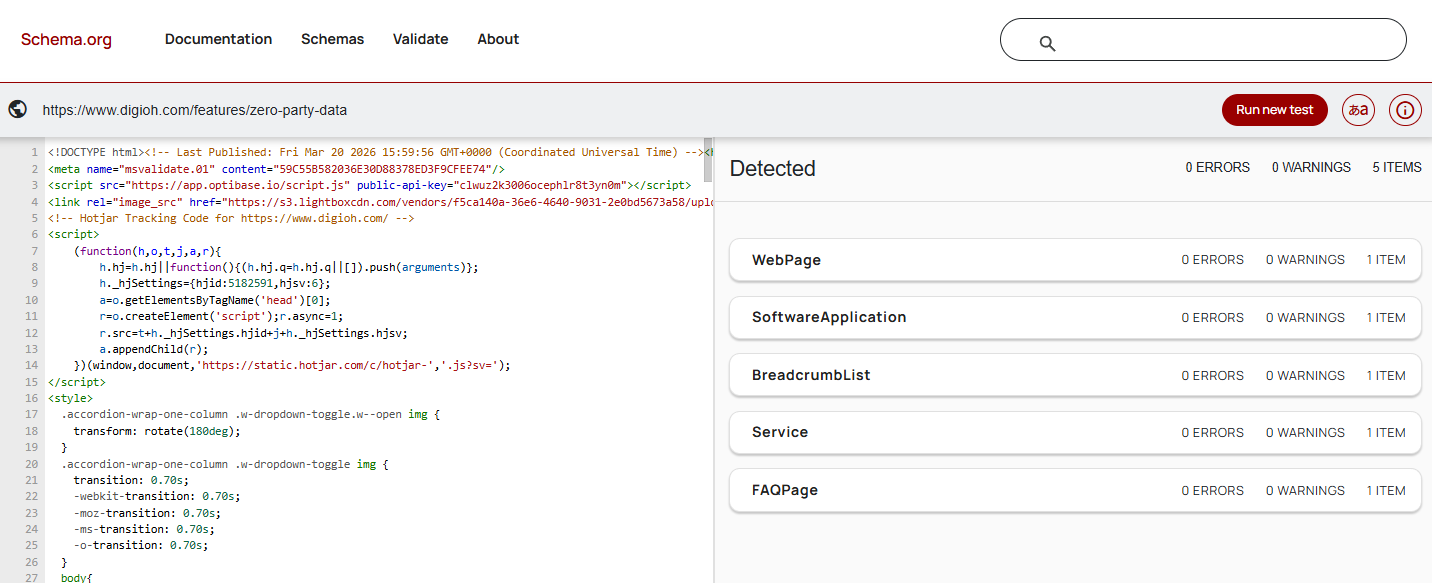
The schema.org validator tool gives you a clear view of all schema types available on a page and shows you the errors and warnings, even showing the HTML behind the page to help you pinpoint where the errors can be found.
When in doubt, less is more
A page with one accurate, well-filled schema type will consistently outperform a page with five loosely applied schema types. Prioritize accuracy and relevance over volume. The goal is not to mark up everything, it’s to mark up the right things, correctly.